

Imagine your accounts payable team arriving at the office every morning to find that, instead of facing an inbox full of PDFs to manually key in, all that work is already done. Invoices — received by email, SharePoint, or file server — have been read, interpreted, and are ready for review or, in the best case, have already flowed straight into the system without anyone touching a single field.
That, in essence, is what Invoice Capture in D365F&O delivers. And it’s not a future promise: it has been generally available for some time now, and it keeps getting better.
What is Invoice Capture?
Invoice Capture is a solution built into D365F&O that automates the entire cycle of receiving, validating, and processing vendor invoices. It works by leveraging Microsoft’s AI Builder — an OCR (optical character recognition) technology powered by artificial intelligence — to read the content of any invoice in digital format.
What makes it stand out is that it does not require all invoices to follow the same layout. The AI model comes pre-trained and is fine-tuned based on your company’s actual usage: it learns from the corrections made by the accounts payable team and, over time, invoices from the same vendor are processed with less and less human intervention.
Invoice types supported
Not all invoices are the same, and Invoice Capture knows it. It supports three types:
-
Purchase order invoice (PO Invoice): linked to one or more purchase orders. Both the header and the lines must be reviewed in Invoice Capture before transferring to D365F&O.
- Header-only invoice: also associated with a purchase order or product receipt, but without line review. If automatic line creation is enabled, the lines are generated directly from the purchase order or product receipt in D365F&O, so only the header needs to be reviewed in Invoice Capture.
- Cost invoice: no purchase order associated. Contains items that are not stocked, whether service items, procurement category items, or it can be transferred directly to an invoice journal.
The magic behind it: how derivation works
The key word in the process is “derivation”: the system attempts to automatically deduce all the information needed to process the invoice without human intervention. This includes:
- The legal entity the invoice belongs to
- The vendor account
- The invoice type
- The item number or procurement category
- The related purchase order and currency code
If everything is derived correctly, the invoice can be transferred to D365F&O without anyone having looked at the screen. This is known as touchless processing, and it is the ultimate goal of the accounts payable department.
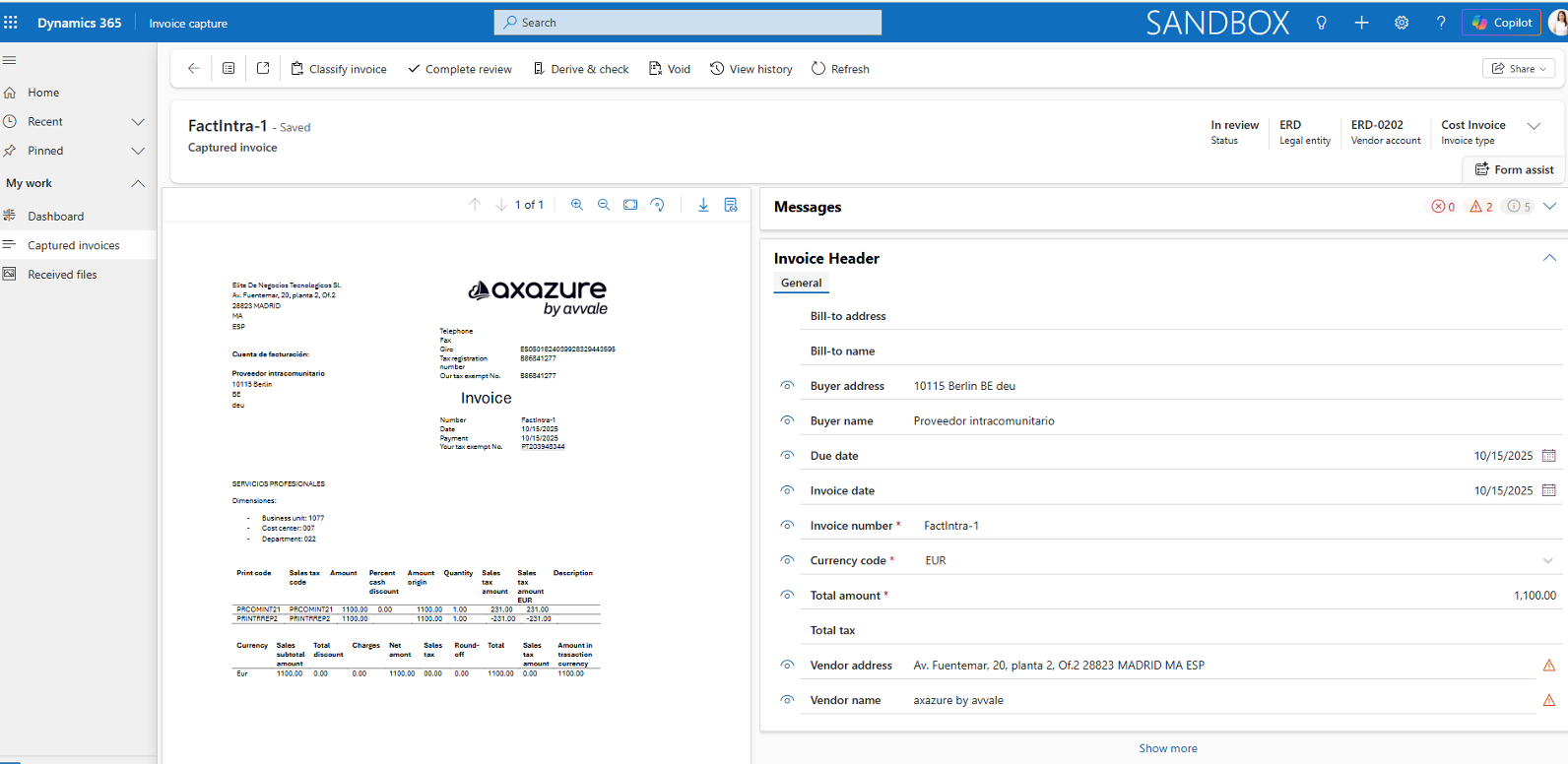
The workspace: where the accounts payable team lives
Invoice Capture has its own workspace deployed on Power Platform, integrated with D365F&O. The most widely used feature is the side-by-side viewer: a screen that simultaneously displays the original invoice PDF and the fields interpreted by the AI.
If anything needs correcting, the operator does it right there, without switching between systems. Once everything has been validated, they click “Transfer” and the invoice flies straight into D365F&O
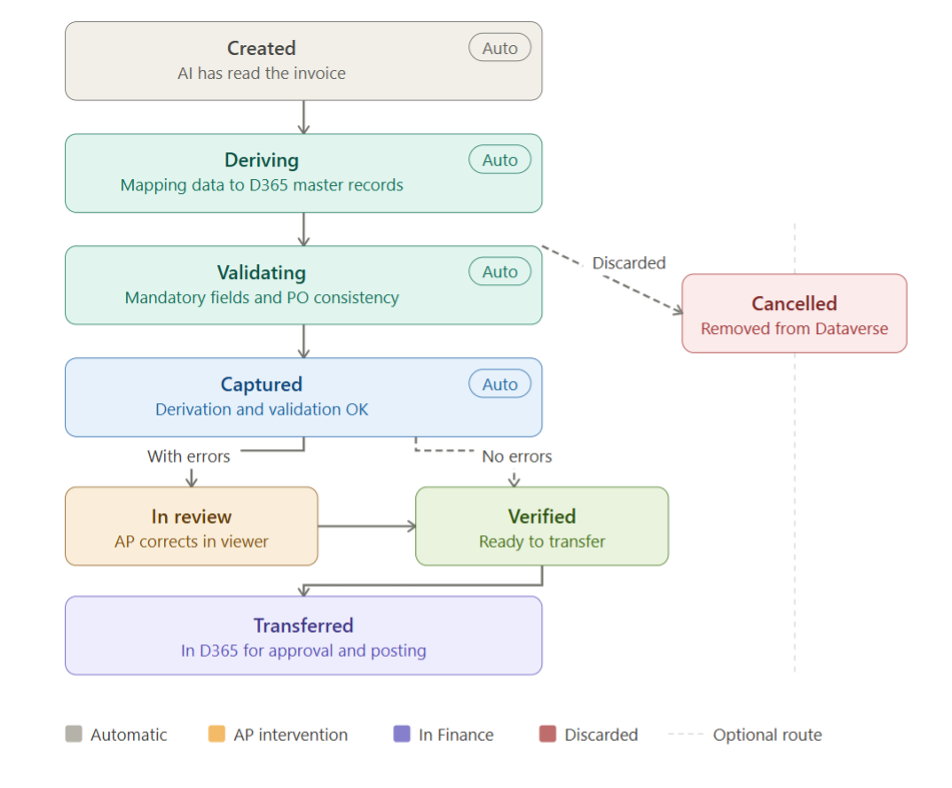
Statuses of a captured invoice
What’s on the horizon: Wave 1 2026
Microsoft’s official release plan confirms a cohesive Invoice Capture update with public preview in version 10.0.49 (September 2026). The general availability date has not yet been published. The stated objective is to increase touchless processing rates, reduce operational costs, and strengthen confidence in invoice automation. The improvements are grouped into three blocks:
| Improvement | What it means in practice |
|---|---|
| AI-driven header derivation | Improves header-level matching with purchase orders and procurement categories using vendor data. Continuous learning applies user corrections to future invoices, increasing touchless processing and reducing repeated manual effort. |
| Invoice and purchase order side-by-side view | Allows users to view invoice lines, the PDF, and PO details simultaneously. Reduces context switching during manual matching, speeds up exception resolution, and lowers the risk of user error without modifying existing PO structures. |
| Enhanced charge recognition and assignment | Automatically identifies and classifies header and line-level charges. Charges are assigned using rules defined during transfer to Finance, preventing invoice total mismatches and reducing downstream corrections. |
Who benefits the most?
| Profile | Main benefit |
|---|---|
| AP Clerk | Less manual keying, fewer errors, more time for value-added tasks. |
| AP Manager | Greater visibility into the status of each invoice, better control of the payment cycle. |
| CFO / Finance Director | Reduced operational costs, lower risk of errors or fraud, faster period-end close. |
| IT / System Admin | Deployment via Marketplace, native integration with Power Platform, no custom development needed for the basic flow. |
Before you start: What you need to know
Prerequisites
The Dynamics 365 Finance environment must be integrated with Power Platform (Dataverse environment). The solution is installed from Marketplace. The InvoiceCaptureOperator role in Finance is mandatory for all users accessing Invoice Capture.
Licensing summary
100 transactions per tenant/month included with D365 Finance (non-cumulative: use them or lose them). Additional volume: USD 300 per 1,000 transactions/month. Users without a full Finance licence need a Power Apps licence with the InvoiceCaptureOperator role assigned. Dataverse storage: 20 GB of file storage and 10 GB of database storage by default (shared across applications); additional subscriptions may be required if capacity is insufficient.
To sum up
Invoice Capture is not just a glorified OCR tool. It is a solution that combines artificial intelligence, continuous learning, and native integration with Dynamics 365 Finance to transform one of the most repetitive and error-prone processes in the finance area.
And the best part is that it keeps improving: Microsoft publishes monthly updates and the Wave 1 2026 roadmap points to significant leaps in automation and intelligence. If your organisation is still processing invoices manually, now is the time to ask whether it makes sense to keep doing so.
About the Author: Lara Sánchez Ramos